
Rule Priority & Execution Logic
MIDA checks every visitor in a fixed order. As soon as one check allows or blocks the visitor, the rest are skipped. The order can’t be changed in the app.
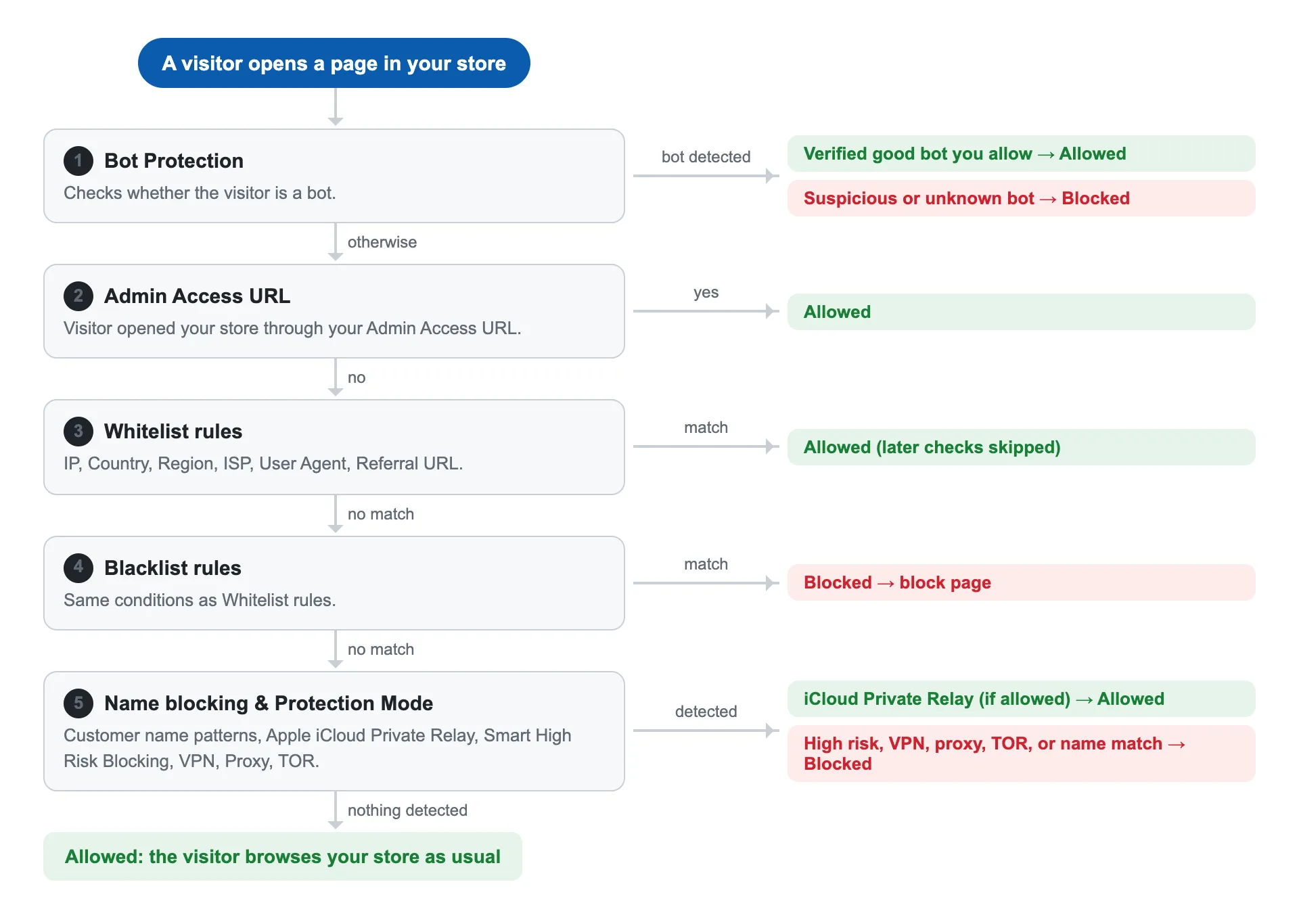
The Order of Checks
Section titled “The Order of Checks”- Bot Protection: verified good bots you allow are let through; suspicious or unknown bots are blocked.
- Admin Access URL: the page you open through your Admin Access URL is allowed.
- Whitelist rules: a match is allowed, and all checks below are skipped.
- Blacklist rules: a match is blocked and sees your block page.
- Allow Apple iCloud Private Relay: if turned on, Private Relay users are allowed.
- Name blocking, Smart High Risk Blocking, Block Proxy, Block VPN, Block TOR: the visitor is blocked if any of these that you turned on matches.
Steps 5 and 6 only run for visitors who didn’t match any Whitelist or Blacklist rule.
Common Questions
Section titled “Common Questions”A visitor is on my Whitelist and uses a VPN. Are they blocked?
No. Whitelist rules are checked before VPN blocking, so the visitor is allowed.
I blacklisted a country but whitelisted one IP address from it. What happens?
The visitor with that IP is allowed, because Whitelist rules are checked first. Everyone else from that country is blocked.
A visitor from a blacklisted country uses a VPN to appear in another country. Are they blocked?
MIDA checks the country of the IP address the visitor connects from. If that country isn’t blacklisted, the Country rule doesn’t match, but Block VPN blocks them if you turned it on.
Does a Whitelist rule let bots through?
No. Bot Protection runs first, so suspicious bots are blocked even if they match a Whitelist rule.
Does Apple iCloud Private Relay override my Blacklist?
No. Blacklist rules are checked first. Private Relay only prevents Protection Mode from blocking those visitors as proxy users.
Related
Section titled “Related”If you have any questions, feel free to contact us via Crisp Chat or email us at [email protected].