
Visitor Analytics
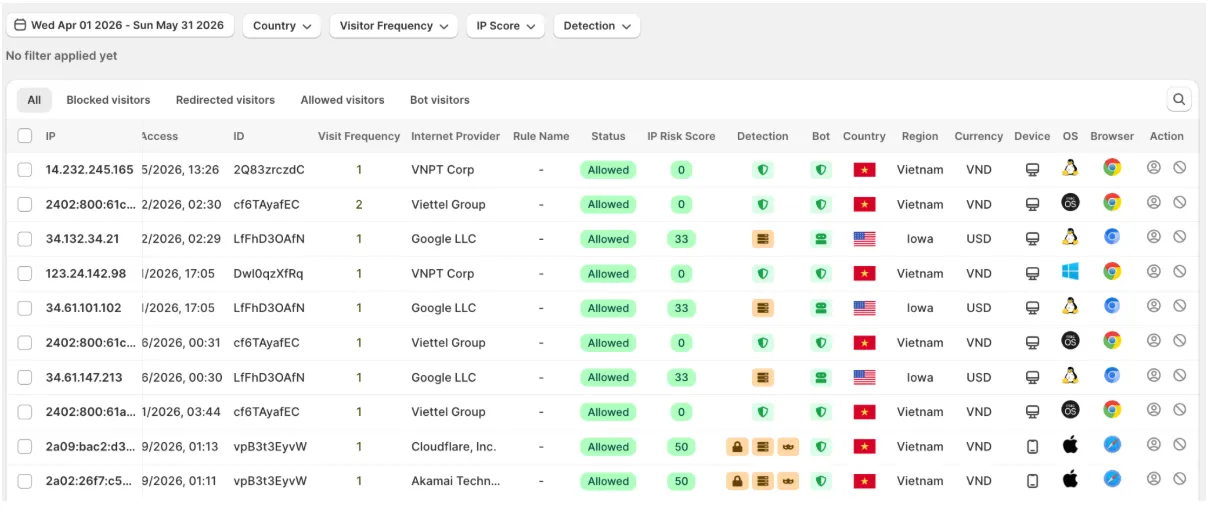
Visitor Analytics provides detailed insights into who is visiting your Shopify store and how they interact with it. Monitor visitor activity in real time, identify suspicious or blocked visitors, and analyze traffic patterns to better understand your audience and strengthen your fraud protection strategy.
Visitor Information
Section titled “Visitor Information”The analytics table provides detailed information for every visitor, including:
- Visitor IP address and location
- Country, region, ISP, and network information
- Device, browser, and operating system
- Visit timestamps and visitor frequency
- IP Risk Score
- Detection indicators, including:
- VPN
- Proxy
- TOR
- Bot
- Apple iCloud Private Relay
- Other anonymous traffic signals
- Visitor status:
- Allowed
- Blocked
- Redirected
- Matched blocking rules (if applicable)
This information helps you quickly identify suspicious visitors and understand how your protection rules are performing.
Filter Visitor Activity
Section titled “Filter Visitor Activity”Use the filters at the top of the page to focus on the traffic that matters most.
Date Range
Section titled “Date Range”View visitors within a selected time period.
Country
Section titled “Country”Filter traffic by country or region to analyze where your visitors are coming from.
Visitor Frequency
Section titled “Visitor Frequency”Identify:
- First-time visitors
- Returning visitors
- High-frequency visitors
This can help detect repeated visits from suspicious users.
IP Risk Score
Section titled “IP Risk Score”Filter visitors based on their IP Risk Score to focus on:
- Low-risk traffic
- Medium-risk traffic
- High-risk traffic
Detection Type
Section titled “Detection Type”Review visitors detected as:
- VPN
- Proxy
- TOR
- Bot
- Apple iCloud Private Relay
- Other anonymous traffic types
Visitor Status
Section titled “Visitor Status”Switch between different traffic categories to review specific visitor groups:
- All Visitors
- Blocked Visitors
- Redirected Visitors
- Allowed Visitors
- Bot Visitors
Investigate Suspicious Traffic
Section titled “Investigate Suspicious Traffic”You can combine multiple filters to quickly investigate unusual traffic patterns.
For example, you can:
- View high-risk visitors from a specific country.
- Review visitors blocked by a particular rule.
- Analyze repeated visits from the same IP address.
- Identify anonymous traffic using VPN, Proxy, or TOR.
Using these insights, you can fine-tune your blocking rules and improve your store’s overall protection.
If you have any questions, feel free to contact us via Crisp Chat or email us at [email protected].