
Dashboard & App Status
The Dashboard is the first page you see when you open MIDA Fraud. It shows whether the app is protecting your store, which protection features you use, and a summary of what was blocked.
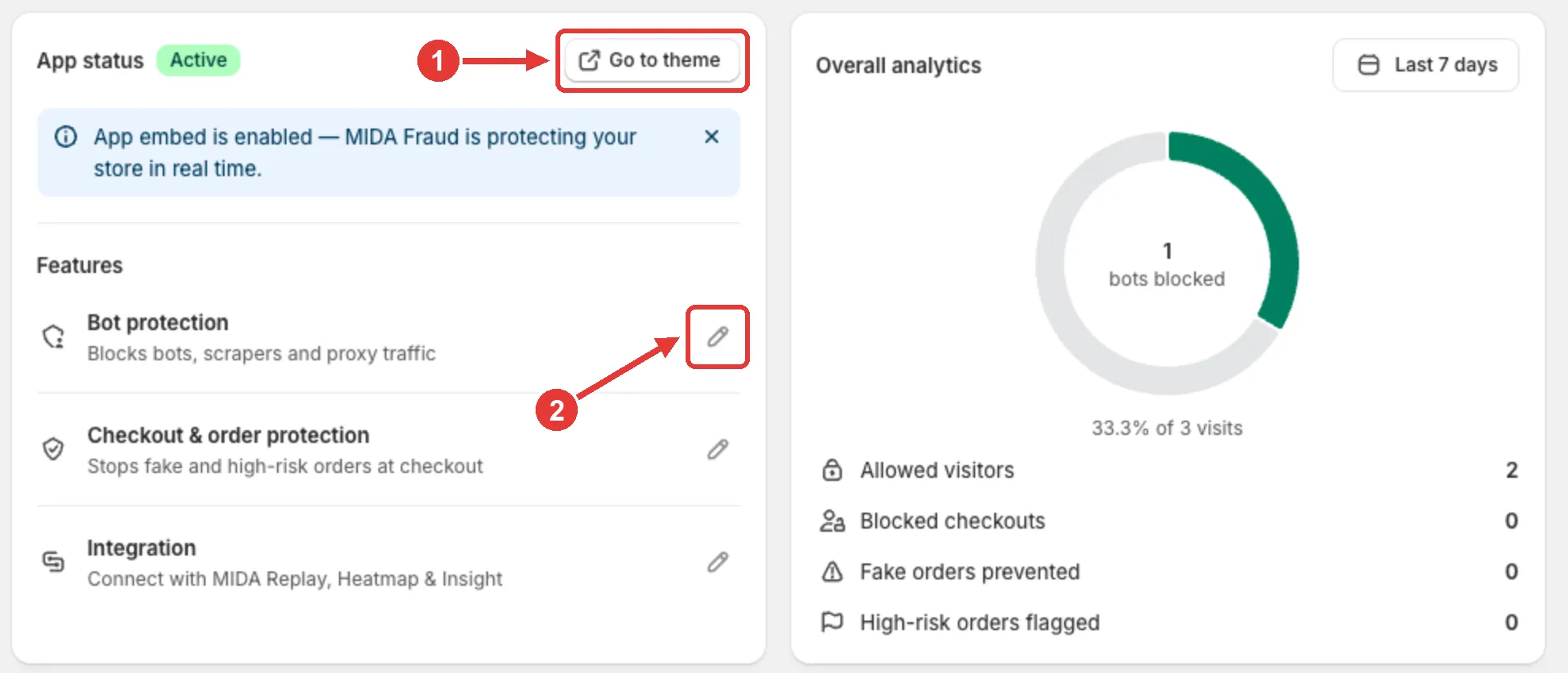
App Status
Section titled “App Status”The App status card tells you whether the MIDA app embed is enabled in your theme.
- Active: the app embed is enabled, and the card shows App embed is enabled — MIDA Fraud is protecting your store in real time.
- Inactive: the card shows App embed is not active. Your rules are saved, but nobody is blocked. Click Activate embed to fix it.
Click Go to theme (1) to open the theme editor and check the app embed. See First-Time Setup.
Features
Section titled “Features”Below the status, the card lists your main protection features:
- Bot protection: blocks bots, scrapers, and proxy traffic.
- Checkout & order protection: stops fake and high-risk orders at checkout.
- Integration: connects MIDA Fraud with MIDA Replay, Heatmap & Insight.
Click the pencil icon (2) next to a feature to open its settings.
Overall Analytics
Section titled “Overall Analytics”The Overall analytics card summarizes your protection for the selected period:
- Bots blocked, and their share of all visits
- Allowed visitors
- Blocked checkouts
- Fake orders prevented
- High-risk orders flagged
Click the date button (Last 7 days by default) to choose another period, such as Today, Last 30 days, This month, or a custom range.
For details on each visitor and order, go to Analytics. Visitors are only counted while visitor tracking is on. See Enable Visitor Tracking.
Other Sections
Section titled “Other Sections”- Get Started: on new stores, a checklist of three setup steps: enable the app, create your first rule, and enable visitor tracking. It disappears when all steps are done. See First-Time Setup.
- Language: use the language menu in the top-right corner to change the app language.
- Help: at the bottom of the page, open the user guide, send a feature request, read the privacy policy, or chat with our support team.
If you have any questions, feel free to contact us via Crisp Chat or email us at [email protected].