
First-Time Setup
The First-Time Setup guide helps you quickly configure the essential settings required for MIDA Fraud IP Blocker to start protecting your Shopify store.
Follow the steps below to complete the initial setup.
Step 1: Enable Theme App Extension
Section titled “Step 1: Enable Theme App Extension”To allow MIDA to protect your storefront, you first need to enable the Theme App Extension.
- Click Enable Theme App Extension.
- Shopify will redirect you to your Theme Editor.
- Enable the MIDA Fraud IP Blocker app extension.
- Save your changes.
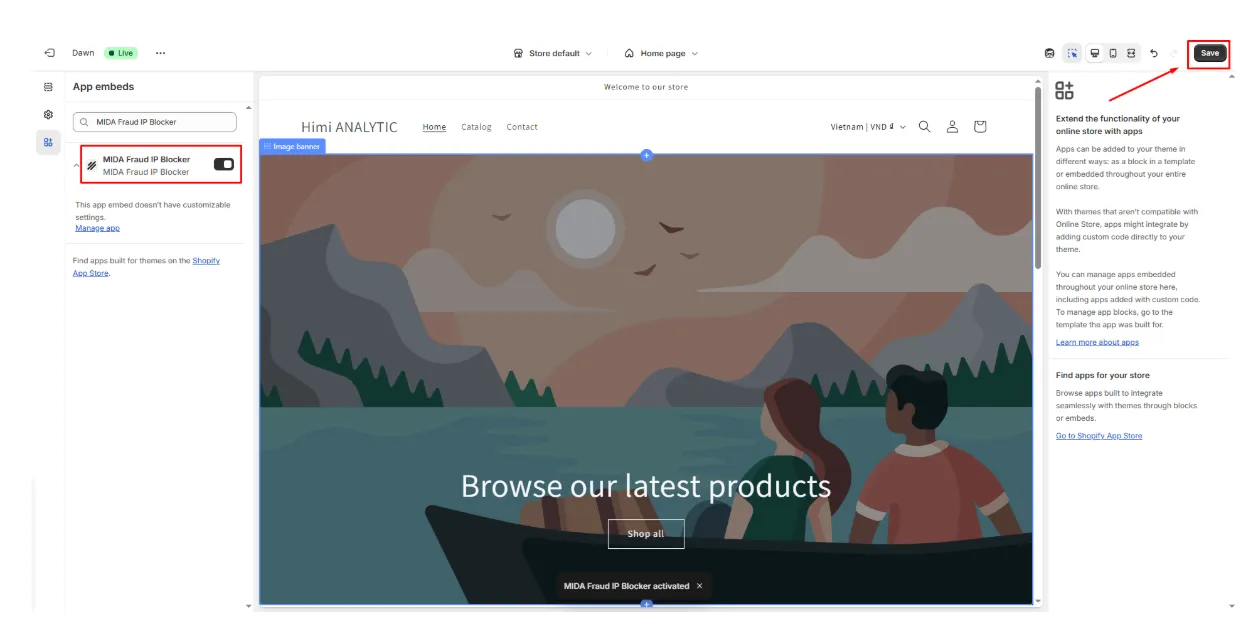
After completing this step, the onboarding status will automatically change to Done.
Step 2: Create Your First Rule
Section titled “Step 2: Create Your First Rule”Next, create your first protection rule.
- Go to Rules.
- Click New Rule.
- Configure the conditions and action for your rule.
- Click Save.
Your first rule enables MIDA to start evaluating visitors based on the conditions you define. After saving the rule, this step will be marked as Done.
Step 3: Review Settings
Section titled “Step 3: Review Settings”Finally, review the available security settings to customize how MIDA protects your store.
We recommend exploring features such as:
- VPN Blocking
- Proxy Blocking
- Tor Network Blocking
These settings provide an additional layer of protection against anonymous or high-risk visitors.
Onboarding Completed
Section titled “Onboarding Completed”Once all required steps have been completed, the onboarding status will display Onboarding Completed.
The onboarding widget will automatically disappear, and MIDA Fraud IP Blocker will begin protecting your store based on your configured rules.
If you have any questions, feel free to contact us via Crisp Chat or email us at [email protected].