
Advanced Rule Configuration
Advanced Rule Configuration gives you full control over how MIDA handles anonymous and high-risk visitors. Instead of using a preset Protection Mode (Relaxed, Balanced, or Strict), you can manually enable or disable each protection based on your store’s security requirements.
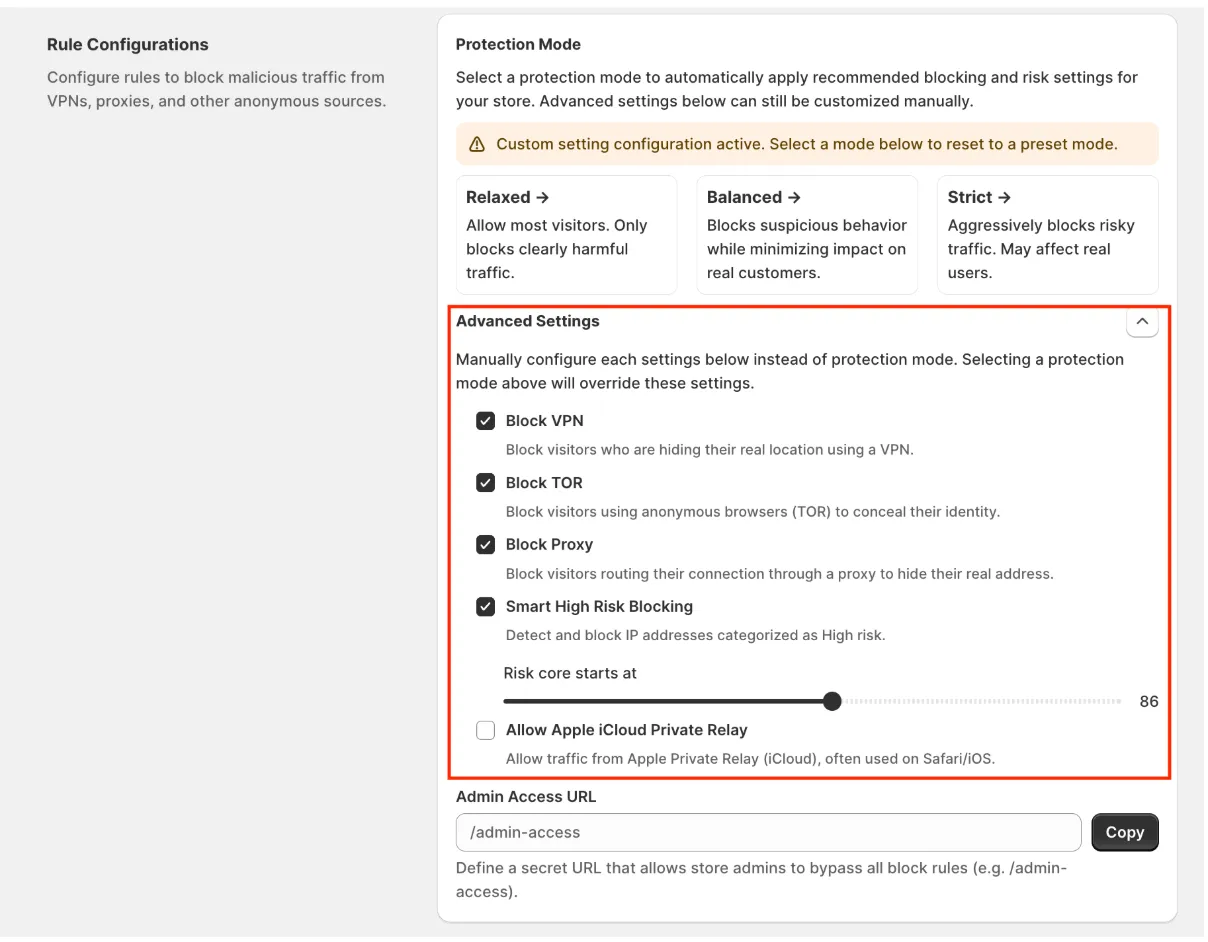
Available Settings
Section titled “Available Settings”Block VPN
Section titled “Block VPN”Blocks visitors who use VPN services to hide their real location.
Enable this option if you want to reduce anonymous traffic and prevent visitors from masking their identity.
Block TOR
Section titled “Block TOR”Blocks visitors accessing your store through the TOR network.
TOR is commonly used for anonymous browsing and may be associated with high-risk traffic.
Block Proxy
Section titled “Block Proxy”Blocks visitors connecting through proxy servers.
This helps prevent users from hiding their original IP address.
Smart High Risk Blocking
Section titled “Smart High Risk Blocking”Automatically blocks visitors whose IP addresses are identified as high risk based on MIDA’s IP Risk Score.
This feature continuously evaluates visitor risk without requiring you to manually maintain a blocklist.
Risk Score Threshold
Section titled “Risk Score Threshold”Defines the minimum IP Risk Score required before a visitor is blocked.
- A lower threshold blocks more suspicious traffic but may increase false positives.
- A higher threshold is less aggressive and reduces the chance of blocking legitimate customers.
Choose a threshold that best matches your store’s risk tolerance.
Allow Apple iCloud Private Relay
Section titled “Allow Apple iCloud Private Relay”Allows visitors using Apple iCloud Private Relay to access your store, even when anonymous traffic protections are enabled.
This is recommended if a significant number of your customers browse using Safari on iPhone, iPad, or Mac devices.
Admin Access URL
Section titled “Admin Access URL”Creates a secure URL that allows store administrators to bypass all blocking rules.
Use this URL whenever you need unrestricted access to your storefront for testing or store management.
Important: Keep this URL private. Anyone with access to it can bypass your store’s protection rules.
Custom Configuration Mode
Section titled “Custom Configuration Mode”When you manually change any Advanced Rule setting, MIDA automatically switches to Custom Configuration Mode.
In this mode, your manual configuration takes priority over the preset Protection Modes.
Important: Selecting a preset Protection Mode (Relaxed, Balanced, or Strict) again will overwrite all custom settings and restore the recommended configuration for that mode.
If you have any questions, feel free to contact us via Crisp Chat or email us at [email protected].