
Pricing Plans & Feature Limits
MIDA Fraud has a Free plan and three paid plans. This page explains what each plan includes, how to choose or change your plan, and what happens when you reach a limit.
Plans at a Glance
Section titled “Plans at a Glance”| Plan | Price | Best for |
|---|---|---|
| Free | $0 | Start blocking bots and risky traffic |
| Advanced | $9/month | Unlimited storefront protection from bots and risky traffic |
| Unlimited | $19/month | Full protection from storefront to checkout |
| Plus | $39/month | Complete protection with VIP support for Shopify Plus stores |
- Stores on Shopify Plus can choose Free or Plus.
- Other stores can choose Free, Advanced, or Unlimited.
- Paid plans come with a 3-day free trial. Each store gets 3 trial days in total, even if you switch between paid plans.
- Billing is handled by Shopify, and charges appear on your Shopify invoice.
Compare Plans
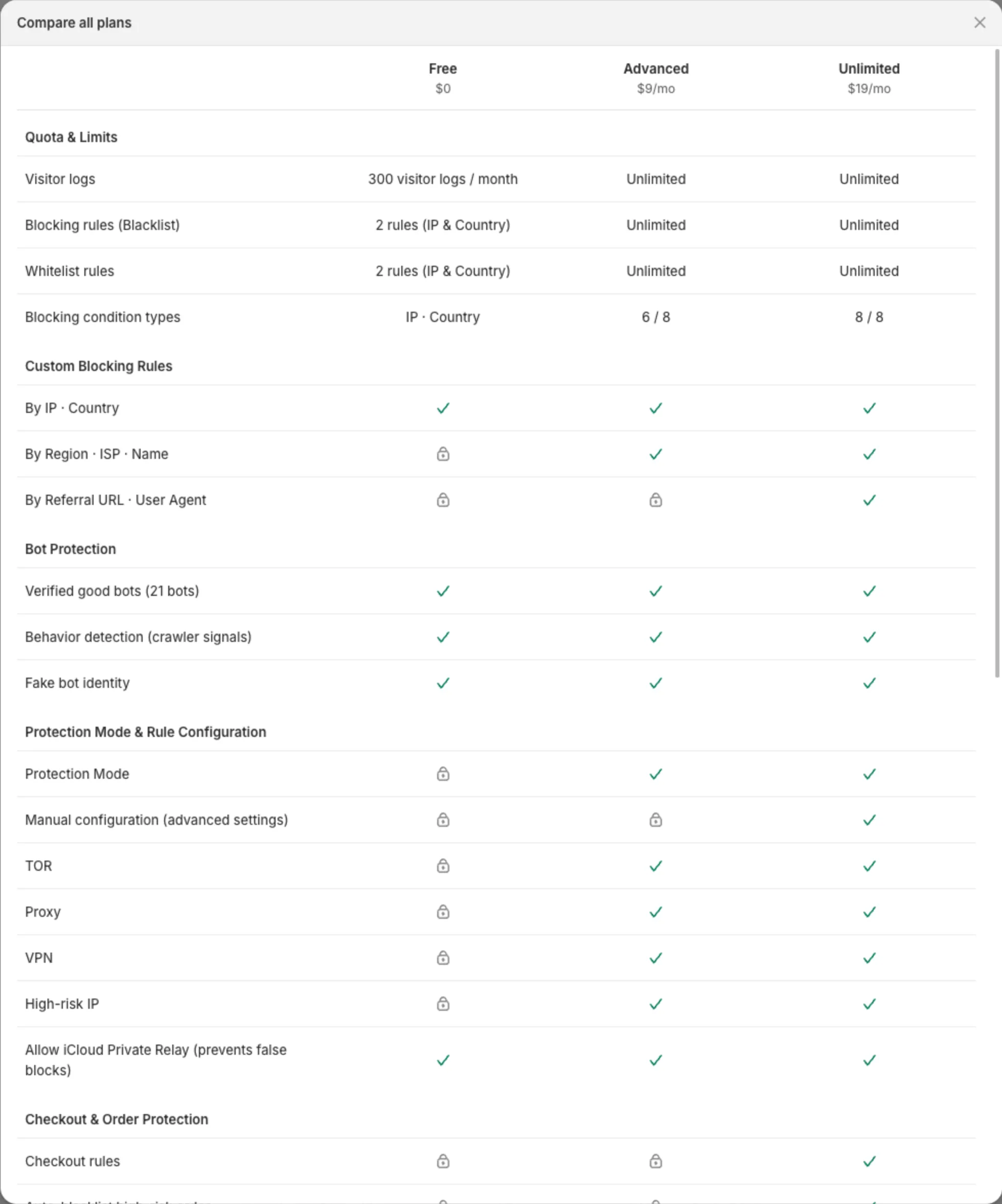
Section titled “Compare Plans”Quota and blocking rules
Section titled “Quota and blocking rules”| Feature | Free | Advanced | Unlimited / Plus |
|---|---|---|---|
| Visitor logs | 300 per month | Unlimited | Unlimited |
| Blacklist rules | 2 (IP & Country) | Unlimited | Unlimited |
| Whitelist rules | 2 (IP & Country) | Unlimited | Unlimited |
| Block by IP, Country | ✓ | ✓ | ✓ |
| Block by Region, ISP, Name | – | ✓ | ✓ |
| Block by Referral URL, User Agent | – | – | ✓ |
Bot Protection and Protection Mode
Section titled “Bot Protection and Protection Mode”| Feature | Free | Advanced | Unlimited / Plus |
|---|---|---|---|
| Verified good bots, crawler signals, fake bot identity | ✓ | ✓ | ✓ |
| Allow Apple iCloud Private Relay | ✓ | ✓ | ✓ |
| Protection Mode: block VPN, Proxy, TOR, high-risk IPs | – | ✓ | ✓ |
| Manual configuration (advanced settings) | – | – | ✓ |
Checkout, content, and block page
Section titled “Checkout, content, and block page”| Feature | Free | Advanced | Unlimited / Plus |
|---|---|---|---|
| Checkout rules | – | – | ✓ |
| Block fake orders | – | – | ✓ |
| Auto-blacklist high-risk orders | – | – | ✓ |
| Disable text selection | – | ✓ | ✓ |
| Disable shortcuts, DevTools, right-click | – | – | ✓ |
| Block page presets and Desktop / Mobile preview | ✓ | ✓ | ✓ |
| Customize block page and Custom CSS | – | ✓ | ✓ |
Analytics, settings, and support
Section titled “Analytics, settings, and support”| Feature | Free | Advanced | Unlimited / Plus |
|---|---|---|---|
| Export visitors | – | ✓ | ✓ |
| Export orders | – | – | ✓ |
| Admin Access URL | ✓ | ✓ | ✓ |
| MIDA Replay integration | ✓ | ✓ | ✓ |
| 24/7 live chat | ✓ | ✓ | ✓ |
| Expert onboarding and rule review, priority support | – | – | ✓ |
To see the full comparison in the app, open Pricing plans and click Compare all plans.
Choose Your Plan
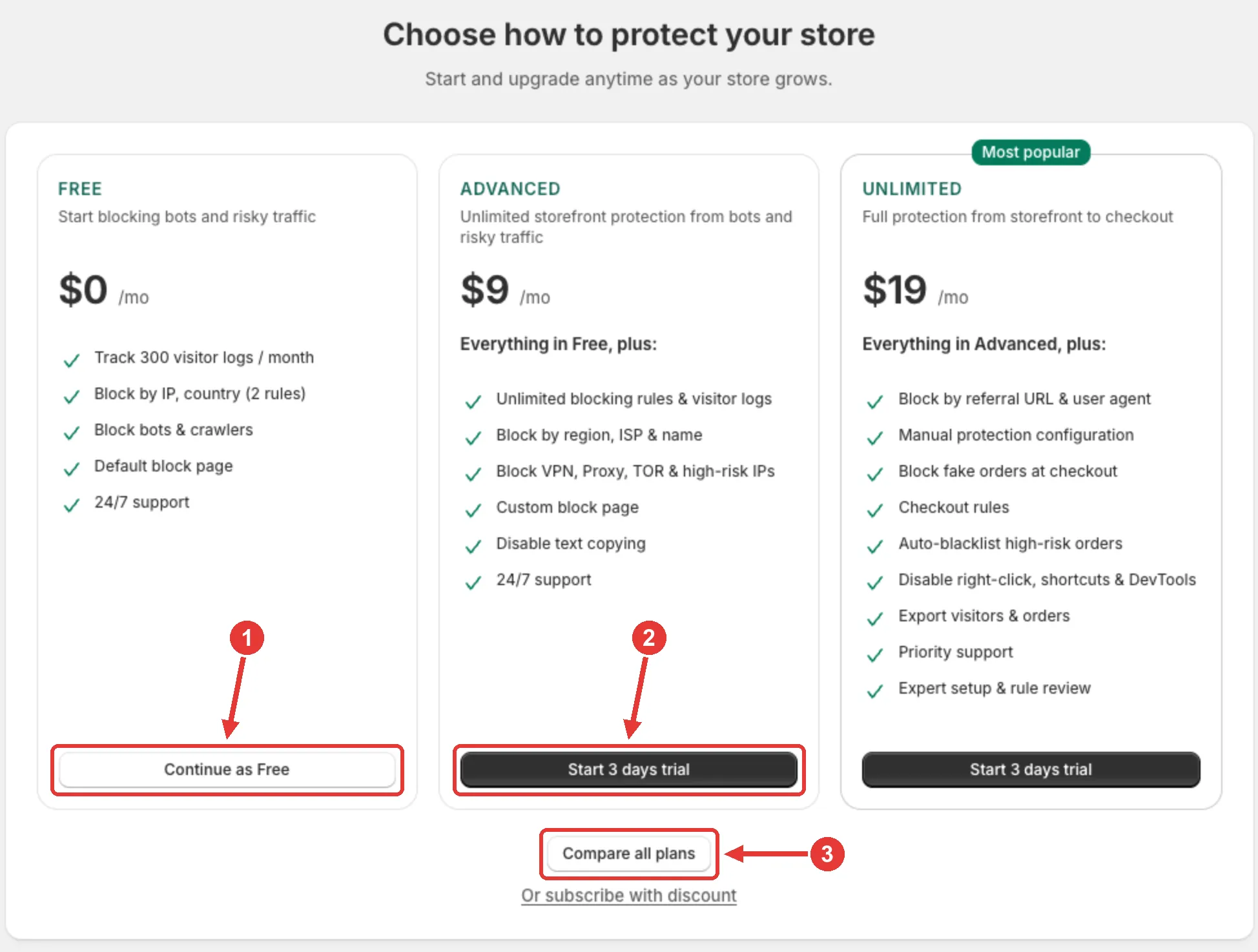
Section titled “Choose Your Plan”When you install MIDA Fraud, the app opens the Choose how to protect your store screen first. Select a plan to continue:
- Click Continue as Free (1) to start on the Free plan.
- Click Start 3 days trial (2) on a paid plan, then approve the charge in Shopify.
- Click Compare all plans (3) to see the full comparison.
You can change your plan at any time.
Change Your Plan
Section titled “Change Your Plan”- In the MIDA Fraud app, go to Pricing plans.
- Click Upgrade or Downgrade on the plan you want.
- For a paid plan, approve the charge in Shopify.
If you have a discount code, click Or subscribe with discount, enter the code, and click Apply before you subscribe.
When you switch to the Free plan, your paid subscription is cancelled, and rules and features that aren’t included in the Free plan are turned off.
When You Reach a Limit
Section titled “When You Reach a Limit”- Locked features show a lock icon and a message such as Upgrade to Advanced plan to unlock. Click it to see the plans.
- Rules on the Free plan: you can have up to 2 active Blacklist rules and 2 active Whitelist rules. When you reach the limit, Create rule takes you to the plans, and you can’t enable another rule until you disable one or upgrade. See Creating Rules.
- Visitor logs on the Free plan: after 300 visitors in a month, MIDA stops recording new visits until the 1st of the next month. Your store stays protected. See Enable Visitor Tracking.
If you have any questions, feel free to contact us via Crisp Chat or email us at [email protected].