
Bot Detection & Blocking
Bot Detection & Blocking helps protect your Shopify store from unwanted automated traffic while allowing trusted bots, such as search engines and official preview services, to access your store normally.
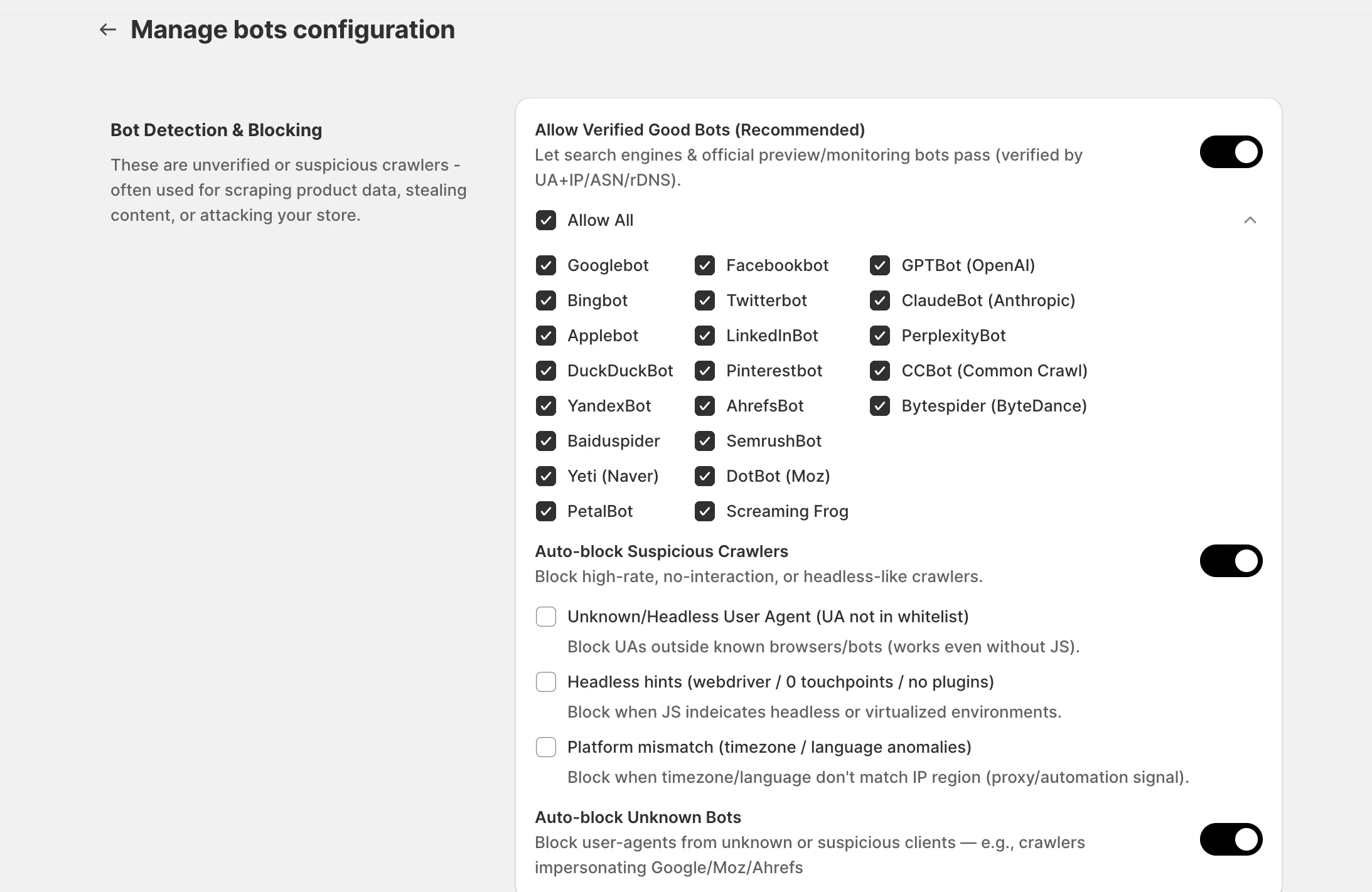
Allow Verified Good Bots
Section titled “Allow Verified Good Bots”This feature allows trusted and verified bots to bypass blocking rules and access your store normally.
MIDA verifies each bot using multiple signals, including:
- User Agent
- IP address
- ASN (Autonomous System Number)
- Reverse DNS lookup
Only bots that successfully pass these verification checks are treated as trusted.
Keeping this feature enabled helps preserve your store’s visibility across search engines and social platforms.
Supported Verified Bots
Section titled “Supported Verified Bots”MIDA currently recognizes many trusted bots, including:
- Googlebot
- Bingbot
- Applebot
- Facebookbot
- Twitterbot (X)
- LinkedInBot
- GPTBot (OpenAI)
- ClaudeBot (Anthropic)
- PerplexityBot
- AhrefsBot
- SemrushBot
- Screaming Frog
- Common Crawl
You can allow or deny each bot individually based on your business requirements.
Should I Enable “Allow Verified Good Bots”?
Section titled “Should I Enable “Allow Verified Good Bots”?”Yes. We strongly recommend keeping this feature enabled.
Disabling verified bots may negatively affect:
- Google indexing and SEO
- Product visibility in search results
- Social media link previews on Facebook, X, LinkedIn, and other platforms
- SEO analysis and auditing tools
Auto-block Suspicious Crawlers
Section titled “Auto-block Suspicious Crawlers”This feature automatically blocks automated traffic that exhibits suspicious or bot-like behavior, including web scrapers, headless browsers, and other automated tools.
You can enable one or more detection methods depending on the level of protection you need.
Unknown / Headless User Agent
Section titled “Unknown / Headless User Agent”Blocks visitors whose User Agent is not recognized as a standard web browser or a verified bot.
This protection is effective against:
- Simple web scrapers
- Automated scripts
- Headless browsers
- Requests with missing or fake User Agents
This detection works even when JavaScript is disabled.
Platform Mismatch
Section titled “Platform Mismatch”Detects inconsistencies between a visitor’s browser settings and their IP location.
Common examples include:
- Browser language does not match the visitor’s country.
- Browser timezone differs significantly from the visitor’s IP region.
These inconsistencies are commonly associated with:
- VPN connections
- Proxy servers
- Automated browsing tools
- Suspicious traffic
Enabling this detection provides an additional layer of protection against anonymous and automated visitors.
If you have any questions, feel free to contact us via Crisp Chat or email us at [email protected].