
Blocked Orders & Overall Analysis
The top of the Checkout Protection page and its Blocked orders tab show what Checkout Protection has stopped.
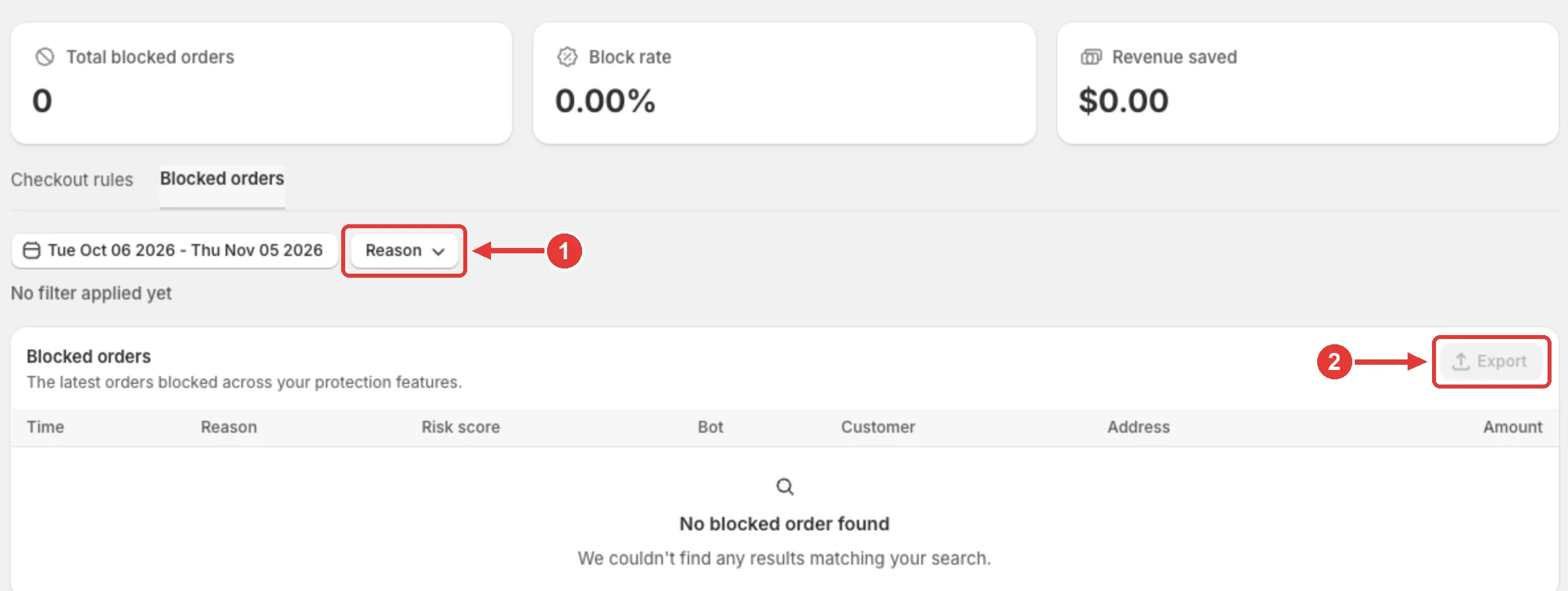
Overall Analysis
Section titled “Overall Analysis”Three cards at the top of the page summarize your checkout protection:
| Card | What it shows |
|---|---|
| Total blocked orders | How many checkouts MIDA blocked. |
| Block rate | The share of checkouts that were blocked. |
| Revenue saved | The total value of the orders that were blocked. |
Blocked Orders
Section titled “Blocked Orders”- In the MIDA Fraud app, go to Checkout Protection.
- Open the Blocked orders tab.
The list shows the latest orders blocked by your protection features, with these columns:
| Column | Description |
|---|---|
| Time | When the checkout was blocked |
| Reason | Rule (a checkout rule matched) or Fake order (Block Fake Order detected it) |
| Risk score | The session’s risk score |
| Bot | Yes if the visitor was detected as a bot |
| Customer | The customer’s details |
| Address | The shipping address |
| Amount | The order value |
To narrow the list:
- Click the date range to choose a period. The last 30 days are shown by default.
- Click Reason (1) to show only orders blocked by a Rule or as a Fake order.
Click Export (2) to download the list. Exporting orders needs the Unlimited or Plus plan.
Related
Section titled “Related”If you have any questions, feel free to contact us via Crisp Chat or email us at [email protected].