
Block Fake Orders
Block Fake Order detects fake or abusive checkouts before an order is created, using the signals MIDA collects while the visitor browses your store. You choose what happens to these checkouts.
How It Works
Section titled “How It Works”While a visitor browses your store, MIDA checks whether they are a bot and gives the session a risk score. At checkout, a checkout is treated as fake when:
- the visitor was detected as a bot, or
- the session’s risk score is high (85 or above).
For fake checkouts, MIDA can:
- Hide payment methods: hide all payment methods from the checkout.
- Hide shipping/delivery options: hide all delivery options from the checkout.
The checkout also shows a message asking the customer to contact your support team, so the order can’t be placed.
These actions don’t apply to orders that are only marked high risk by Shopify. For those, use High-Risk Orders.
Turn On Block Fake Order
Section titled “Turn On Block Fake Order”- In the MIDA Fraud app, go to Checkout Protection.
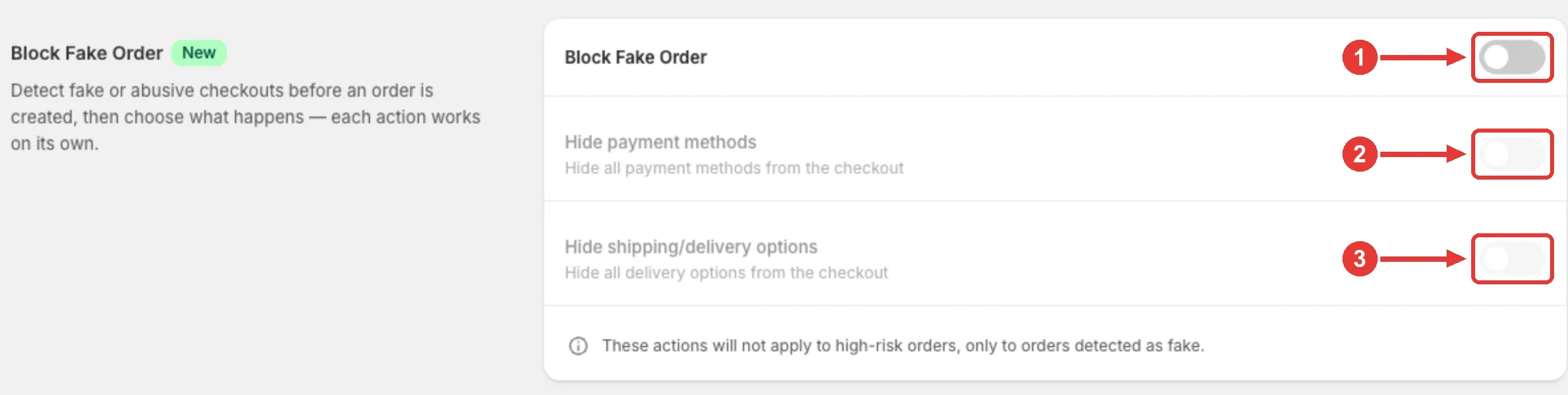
- In the Block Fake Order section, turn on Block Fake Order (1).
- Turn on the actions you want, each works on its own:
- Hide payment methods (2)
- Hide shipping/delivery options (3)
- If the app asks you to Connect the Shopify Payment customization or Shopify Delivery customization, click Connect. It takes one click and applies to this store only. The actions can’t run until the customization is connected.
- Make sure the MIDA Checkout Rule is turned on, so the checkout itself can be blocked. See Block Checkout.
See What Was Blocked
Section titled “See What Was Blocked”Go to Checkout Protection → Blocked orders and filter Reason = Fake order. See Blocked Orders & Overall Analysis.
Block Fake Orders vs High-Risk Orders
Section titled “Block Fake Orders vs High-Risk Orders”| Block Fake Orders | High-Risk Orders | |
|---|---|---|
| Based on | MIDA’s bot detection and session risk score | Shopify’s own order risk assessment |
| When | Before the order is created | After Shopify marks an order as High risk |
| Action | Blocks the checkout and hides payment and/or delivery options | Adds the customer’s email to your checkout blacklist, so their next checkouts are blocked |
If you have any questions, feel free to contact us via Crisp Chat or email us at [email protected].