
Creating Rules
Create a blocking rule to define which visitors should be allowed or restricted from accessing your Shopify store.
Create a New Rule
Section titled “Create a New Rule”To create a new blocking rule:
- Go to Blocking Rules.
- Select the rule type you want to create, such as:
- IP
- Country
- Region
- ISP (…)
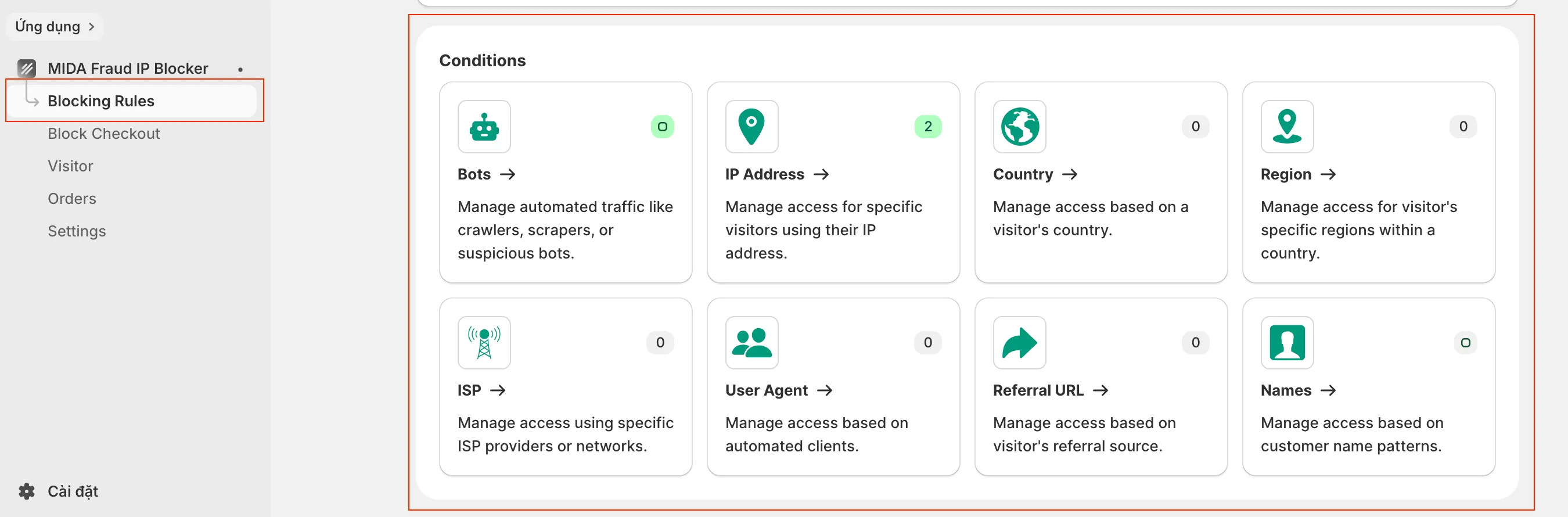
- Choose either Blacklist or Whitelist.
- Click New Rule.
- Configure the rule conditions based on your requirements.
- Click Save.
How It Works
Section titled “How It Works”After the rule is enabled, MIDA immediately starts checking incoming visitors against the configured conditions.
- If a visitor matches a Blacklist rule, the configured blocking action will be applied.
- If a visitor matches a Whitelist rule, they will always be allowed to access your store.
Changes take effect immediately after the rule is saved and enabled.
If you have any questions, feel free to contact us via Crisp Chat or email us at [email protected].