
Overall Workflow
MIDA Fraud protects your store at two points:
- When a visitor opens your store: MIDA checks the visitor in real time and either allows them or shows the block page.
- When a customer checks out: Checkout Protection can stop fake or risky orders before they are placed.
The results of both appear in Analytics and on the Dashboard.
How MIDA Checks a Visitor
Section titled “How MIDA Checks a Visitor”Every time a visitor opens a page, MIDA runs the checks below in order. As soon as one check decides to allow or block the visitor, the remaining checks are skipped.
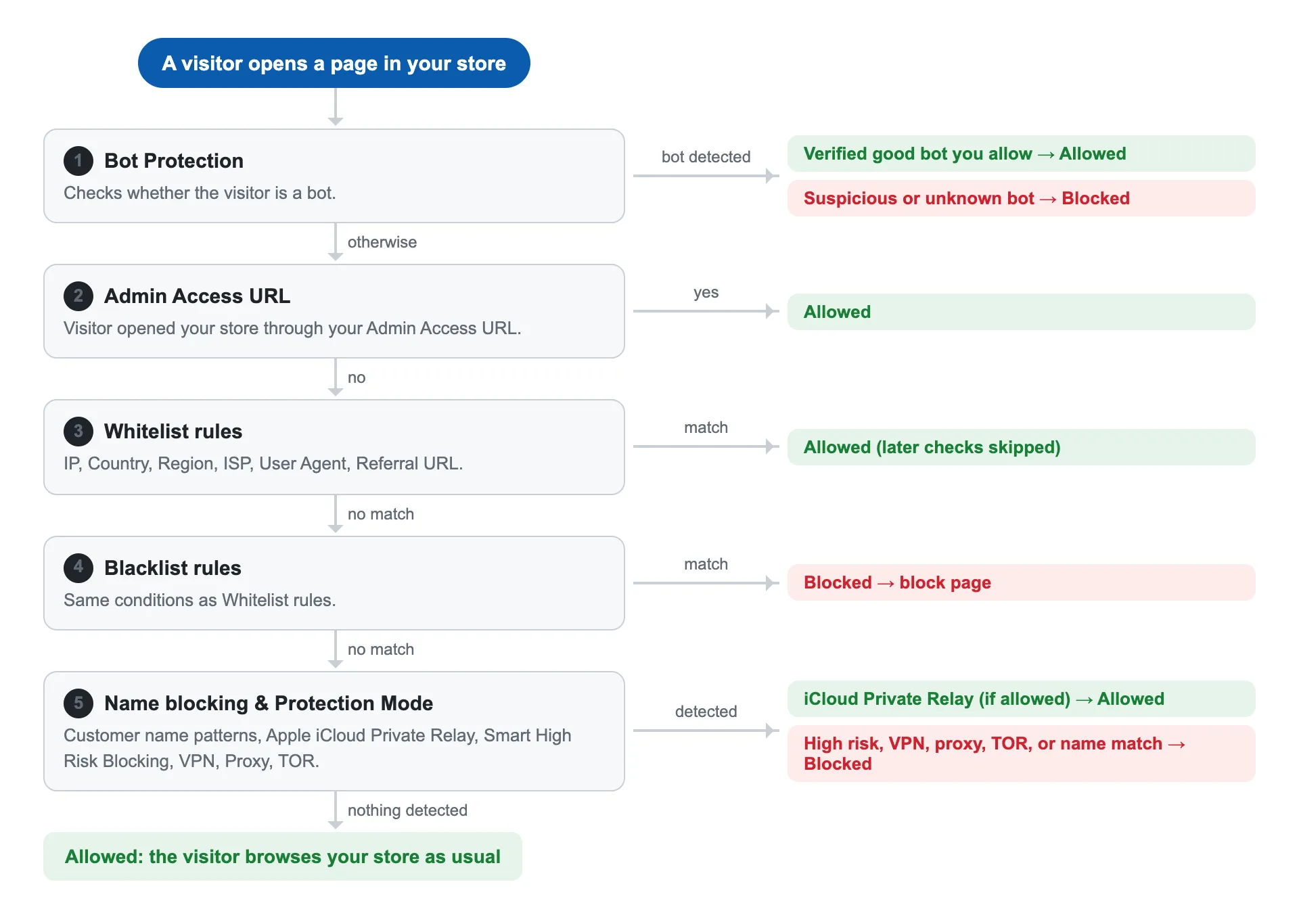
- Bot Protection: verified good bots that you allow (such as Googlebot) are let through. Suspicious or unknown bots are blocked, based on your Bot Protection settings.
- Admin Access URL: you and your team are always allowed when you open the store through your Admin Access URL (set in Settings).
- Whitelist rules: a visitor who matches a Whitelist rule is allowed, and none of the later checks run. This is how you make sure trusted visitors are never blocked by VPN or high-risk detection.
- Blacklist rules: a visitor who matches a Blacklist rule is blocked and sees your block page.
- Name blocking and Protection Mode: these run only when no rule matched:
- Name blocking blocks customer names that look fake (set up on the Names tab of Blocking Rules).
- Allow Apple iCloud Private Relay lets Safari and iOS visitors who use Private Relay through.
- Smart High Risk Blocking blocks IP addresses whose risk score is at or above your threshold.
- Block VPN, Block Proxy, and Block TOR block visitors who hide their real location.
If none of the checks block the visitor, they browse your store as usual.
About rules
Section titled “About rules”- Each rule uses one condition type (IP Address, Country, Region, ISP, User Agent, or Referral URL) and can hold many values. A visitor matches the rule if they match any of its values.
- Each rule applies to your whole store (Global) or only to selected products, collections, or paths (URL specific).
- Rules take effect as soon as you save them.
Learn more in Whitelist & Blacklist Rules and Creating Rules.
How MIDA Checks Orders
Section titled “How MIDA Checks Orders”Checkout Protection works inside your Shopify checkout:
- Checkout rules block a checkout that matches your conditions, such as email, phone number, address, ZIP code, country, cart value, or customer name.
- Block Fake Orders detects fake or abusive checkouts before an order is created, and can hide payment methods or delivery options.
- High-Risk Orders uses Shopify’s own risk assessment: when Shopify marks an order as high risk, the customer’s email can be added to your checkout blacklist automatically.
Learn more in Block Checkout, Block Fake Orders, and High-Risk Orders.
Where You See the Results
Section titled “Where You See the Results”- Analytics → Visitors: every visitor MIDA checked, whether they were allowed or blocked, and why. Visitors are only recorded while Visitor tracking is turned on. See Enable Visitor Tracking.
- Analytics → Orders: orders and their risk level.
- Analytics → Report and the Dashboard: totals of allowed and blocked visitors and blocked orders.
Blocking works whether or not Visitor tracking is on. Tracking only controls whether visits are recorded in Analytics.
If you have any questions, feel free to contact us via Crisp Chat or email us at [email protected].